
Tag Archives: sap b1 software

sap b1

What is SAP B1? Definition, Features and Real Success Story

What is SAP B1? Definition, Features and Real Business Success Story
sap b1

In the competitive business environment, small and medium-sized enterprises (SMEs) need more than spreadsheets to manage operations. This is where SAP Business One (SAP B1) comes in – a powerful and scalable ERP solution designed specifically for growing businesses.

This blog explains what SAP B1 is, its key features, and a real-world success story to help you understand its business impact.

What is SAP B1? Definition

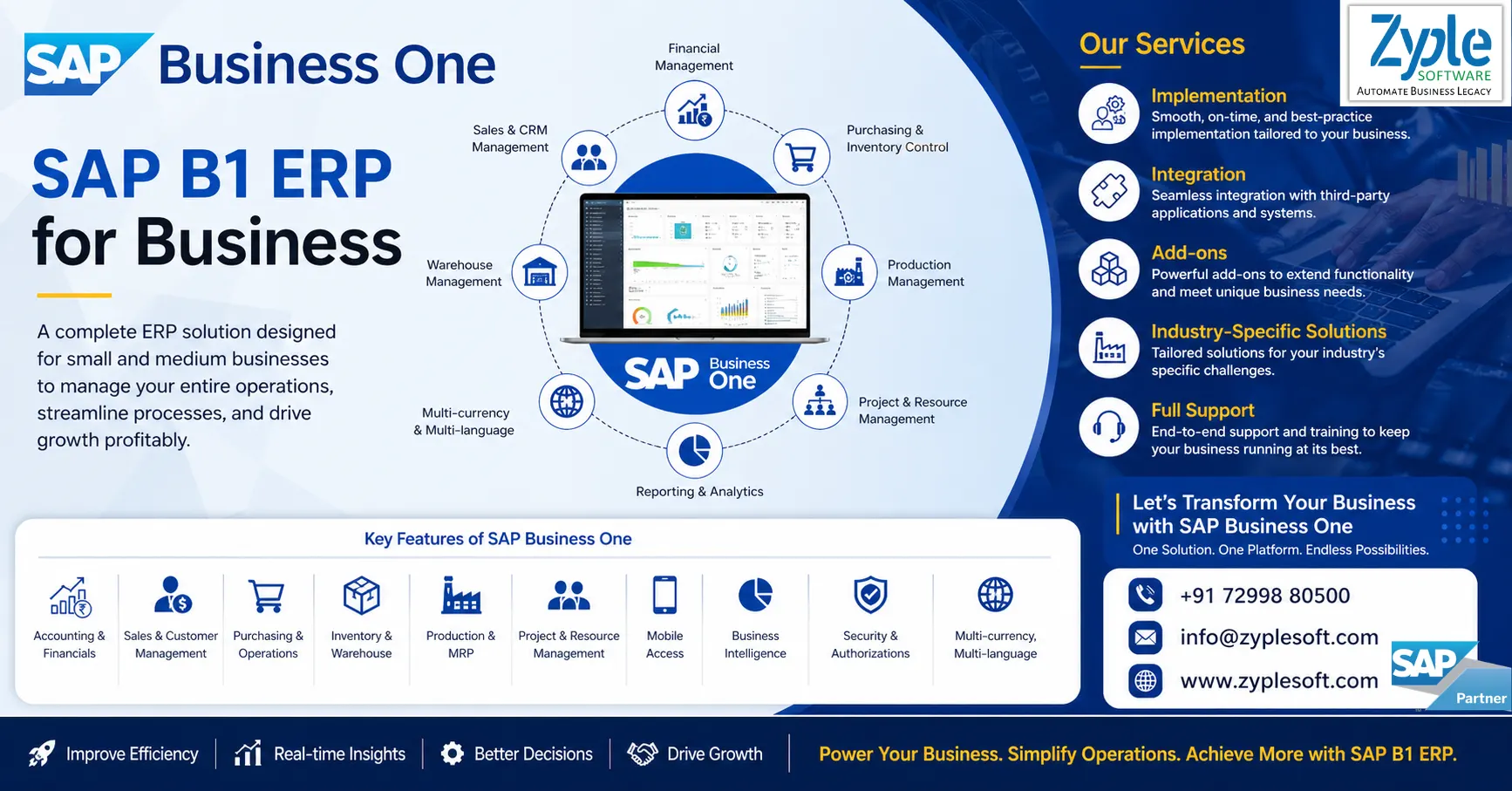
SAP Business One is a centralized business management solution that integrates core business functions such as:

  • Finance
  • Sales
  • Inventory
  • Production
  • Purchasing
  • Customer Relationship Management (CRM)

It provides real-time visibility, automation, and data-driven decision-making from a single platform.

Why Businesses Choose SAP B1?

Unlike traditional systems that operate in silos, SAP B1 connects all departments, ensuring smooth data flow and operational efficiency.

Key Benefits of SAP B1

  1. Real-time business insights
  2. End-to-end process automation
  3. Improved inventory control
  4. Faster financial reporting
  5. Scalable for growing businesses
  6. Industry-specific customization

Core Features of SAP Business One

1. Financial Management

  • General ledger, accounts payable/receivable
  • Budgeting and financial reporting
  • Multi-currency support

2. Sales and Customer Management (CRM)

  • Lead and opportunity tracking
  • Customer lifecycle management
  • Sales forecasting

3. Inventory and Warehouse Management (WM)

  • Real-time stock tracking
  • Batch and serial number management
  • Warehouse optimization

4. Production and MRP (Material Requirements Planning)

  • Bill of Materials (BOM)
  • Production planning and scheduling
  • Demand forecasting

5. Purchasing and Procurement

  • Vendor management
  • Purchase order automation
  • Cost control

6. Business Intelligence and Reporting

  • Interactive dashboards
  • Real-time analytics
  • Custom report generation
There are SAP B1 modules available bring every core business function into one integrated platform for complete operational visibility.

Industries That Use SAP B1

SAP Business One is highly flexible and widely used across industries such as:
  • Manufacturing (Discrete and Process)
  • Construction and Infrastructure
  • Retail and Distribution
  • Garment and Textile
  • Electrical and Electronics
  • Food and Beverage

Real Success Stories with SAP B1

1. Manufacturing Industry Success Story

Company Overview:

A mid-sized manufacturing company producing industrial components struggled with manual processes and disconnected systems.

Challenges:

  • Inventory mismatches and stock shortages
  • Production planning inefficiencies
  • Delayed financial reporting
  • Lack of real-time data visibility

Solution:

The company implemented SAP Business One ERP with:
  • Integrated inventory and warehouse management
  • Automated financial processes
  • Real-time production planning (MRP)
  • Custom dashboards for management

Results:

  • 20% increase in operational efficiency
  • Inventory accuracy improved to 95%+
  • Financial closing time reduced by 50%
  • Reduction in production delays
  • Real-time decision-making across departments

Key Insight:

B1 SAP Solutions transformed operations from manual and reactive to automated and proactive, enabling scalable growth.

2. Construction Industry Success Story

Company Overview:

A growing construction and infrastructure company handling multiple projects faced challenges in project tracking and cost control.

Challenges:

  • Poor project cost visibility
  • Difficulty tracking materials across sites
  • Budget overruns and delayed timelines
  • Manual procurement and billing processes

Solution:

With SAP Business One, the company implemented:
  • Project-based accounting and cost tracking
  • Centralized procurement system
  • Real-time inventory tracking across sites
  • Automated billing and financial integration

Results:

  • 25% improvement in project cost control
  • Real-time visibility into project profitability
  • Reduction in project delays by 23%
  • Improved cash flow management
  • Improved procurement and vendor coordination

Key Insight:

SAP B1 enabled the company to manage multiple projects efficiently with complete financial and operational transparency.
 

Why SAP B1 is Ideal for Growing Businesses?

SAP Business One is not just software but it’s a growth platform. It allows businesses to:
  • Scale operations without system limitations
  • Adapt to industry-specific needs
  • Gain full control over business processes
Whether you are a startup or an established SME, SAP B1 provides the tools needed to compete with larger enterprises.
 

Final Conclusion on SAP B1

If your business is struggling with disconnected systems, manual processes, or lack of real-time insights, SAP implementation can be a game-changer.
 
It empowers organizations with:
  • Complete visibility
  • Better control
  • Smarter decisions
And most importantly, it sets the foundation for sustainable growth.
 
If you are planning for SAP B1, then contact with an expertise SAP Business partner like Zyple Software for successful implementation as per your business needs.


    How to Buy SAP B1 Software

    How to Buy SAP B1 Software?

    How to Buy SAP Business One (SAP B1) Software in India?

    How to Buy SAP B1 Software

    What is SAP Business One ERP?

    The ERP system, SAP Business One (SAP B1) ERP, is a cost-effective, integrated ERP software solution designed for small and medium-sized enterprises (SMEs) and fast-growing companies to manage key operations, including finance, sales, CRM, inventory, and production in one system. It facilitates workflows and delivers real-time analytics to improve decision-making, providing flexible, scalable deployment on-premises or in the cloud. Here, we will discuss how to buy SAP B1 software.

    How to Buy SAP B1 Software Online?

    The Process of buying SAP Business One (SAP B1) software online is primarily done through the official SAP store, where you can identify, configure, and purchase solutions directly. The process involves choosing the appropriate license type (professional or limited), modifying user counts, and integrating with Zyple Software for implementation.

    1. Visit the SAP Store

    Navigate to the SAP store and ensure your country/region is properly selected to see relevant pricing and partners like Zyple Software.

    2. Search and Select

    Use the search bar to find SAP Business One.

    3. Configuration of License

    Choose between a perpetual license or a subscription model based on user types (Professional vs. Limited).

    4. Buy or Integrate

    Click “Buy Now” to purchase directly or “Get It Now” to integrate with a partner like Zyple Software to discuss requirements and implementation.

    5. Payment & Access

    Finish the final payment process. For cloud-based options, you may receive access details directly, while on-premise solutions will involve coordination with Zyple.

    How to Buy SAP Business One Software in India?

    To buy SAP Business One (SAP B1) software in India, you must engage Zyple Software to conduct a needs evaluation, customize, and implement the software. The major steps include choosing a deployment model (cloud or on-premise) and selecting user licenses (professional or limited).

    1. Identify an Authorized Partner

    Contact Zyple Software, a certified SAP Business One partner in India, to receive customized quotes, as they manage sales, implementation, and support.

    2. Needs Evaluation and Demo

    Request an inclusive demonstration and a needs evaluation to define which modules (finance, CRM, and inventory) your business requires.

    3. Choosing a Licensing Model

    This includes two types of SAP B1 licensing models:

    • Professional Users: It is the type of SAP Business One licensing model where users have full access to all modules.
    • Limited UsersIt is the type of SAP Business One licensing model where users have specific or limited access to modules like CRM, finance, and logistics.

    4. Choose Deployment Process

    Choose between on-premise (perpetual license) and cloud (subscription model).

    5. Installation & Full Support

    Work with Zyple to design the system to your requirements and set up continuous maintenance.

    Know About Customized SAP Business One Pricing India

    We understand that the SAP Business One price in India varies based on factors such as company size, user count, data complexity, and user needs. As your trusted SAP B1 partner in India, we specialize in licensing and crafting personalized blueprints to outline the exact SAP Business One pricing for your organization.

    With decades of experience, we navigate you through the complexities of SAP B1 software price and licensing costs, considering factors like purchasing process, database options (SAP B1 SQL or SAP B1 HANA), hosting preferences (cloud or on-premise), and necessary maintenance and support. If you’re concerned, book an SAP B1 demo.

    Whether you’re in manufacturing, construction, real estate, retail, pharmaceuticals, textiles, logistics, energy or any other sector, our customized approach ensures that the SAP Business One cost remains within budget and aligns perfectly with your unique business model and SAP B1 pricing.

    Not only licensing, but when it comes to SAP implementation, our company delivers excellent support and services to different industries like manufacturing, construction, real estate, retail, pharmaceutical, textile, professional services, aerospace and defense, and more to help them cater to their requirements with the growing competition.

    Key Factors That Impact SAP Business One Price in India

    1. Deployment Models like Cloud and On-Premise

    One of the biggest SAP B1 pricing factors is how you choose to launch SAP Business One like on-premise or the cloud.

    Every model has its own cost structure and long-term financial implications.

    2. Number of Users and License Types

    SAP Business One’s pricing differs based on

    • Number of users accessing the SAP B1 system.
    • Type of users (Professional and Limited).

    Businesses can improve costs by selecting the right type of user licenses instead of assigning full access to everyone.

    3. Business Size and Industry Requirements

    The overall cost depends largely on:

    • Size of the organization.
    • Industry-specific needs (manufacturing, construction, real estate, retail, pharmaceutical, textile, professional services, aerospace and defense, and more).

    Some industries may require additional configurations or compliance features, which can impact pricing.

    4. Customization and Add-On Development

    SAP Business One can be improved with:

    • Industry-specific add-ons.
    • Process automation and integrations.

    The level of customization directly impacts the final project cost.

    5. Implementation and Consulting Services

    SAP B1 ERP pricing is not only about SAP Business One licenses; SAP B1 implementation services play a crucial role in the following:

    • System modification.
    • Data migration.
    • User training.
    • Go-live support.

    A structured and expert-led implementation ensures improved ROI and long-term success.

    6. Support, Annual Maintenance Costs, and Managed Services

    Post-implementation costs include:.

    • Support.
    • System upgrades.
    • Performance optimization.
    • Continuous improvements.

    Choosing a reliable SAP partner, Zyple Software, helps reduce these costs while ensuring system stability.

    Types of SAP Business One Licenses

    Experience personalized guidance from experts to navigate SAP Business One price in India, along with maintenance, SAP support, and implementation. Select from a variety of SAP Business One licenses, including professional and limited licenses, designed for your business requirements.

    1. Professional License

    With professional SAP Business One licenses, you can gain the full spectrum of SAP Business One’s capabilities, allowing access to all modules or features. Select between flexible subscription or perpetual license options to match your business needs seamlessly by delivering the most affordable SAP Business One cost. It is the SAP B1 ERP license suitable for users who need complete access to the system, like managers and decision-makers.

    2. Limited License

    In SAP Business One limited licenses, the offerings deliver focused solutions across three areas, such as CRM, financial, and logistics. Every option provides a unique blend of modules and features to handle specific business needs. This type of SAP B1 license helps you to find the ideal fit for your requirements. It is the SAP B1 ERP license suitable for users who require access only to some modules in the SAP B1 system.

    Are you looking for SAP Business One Software for your any business or industry?

    Fill in all the details in the specified contact form; our team will reach out to you.